
Real-Time Lead Reporting and Analytics
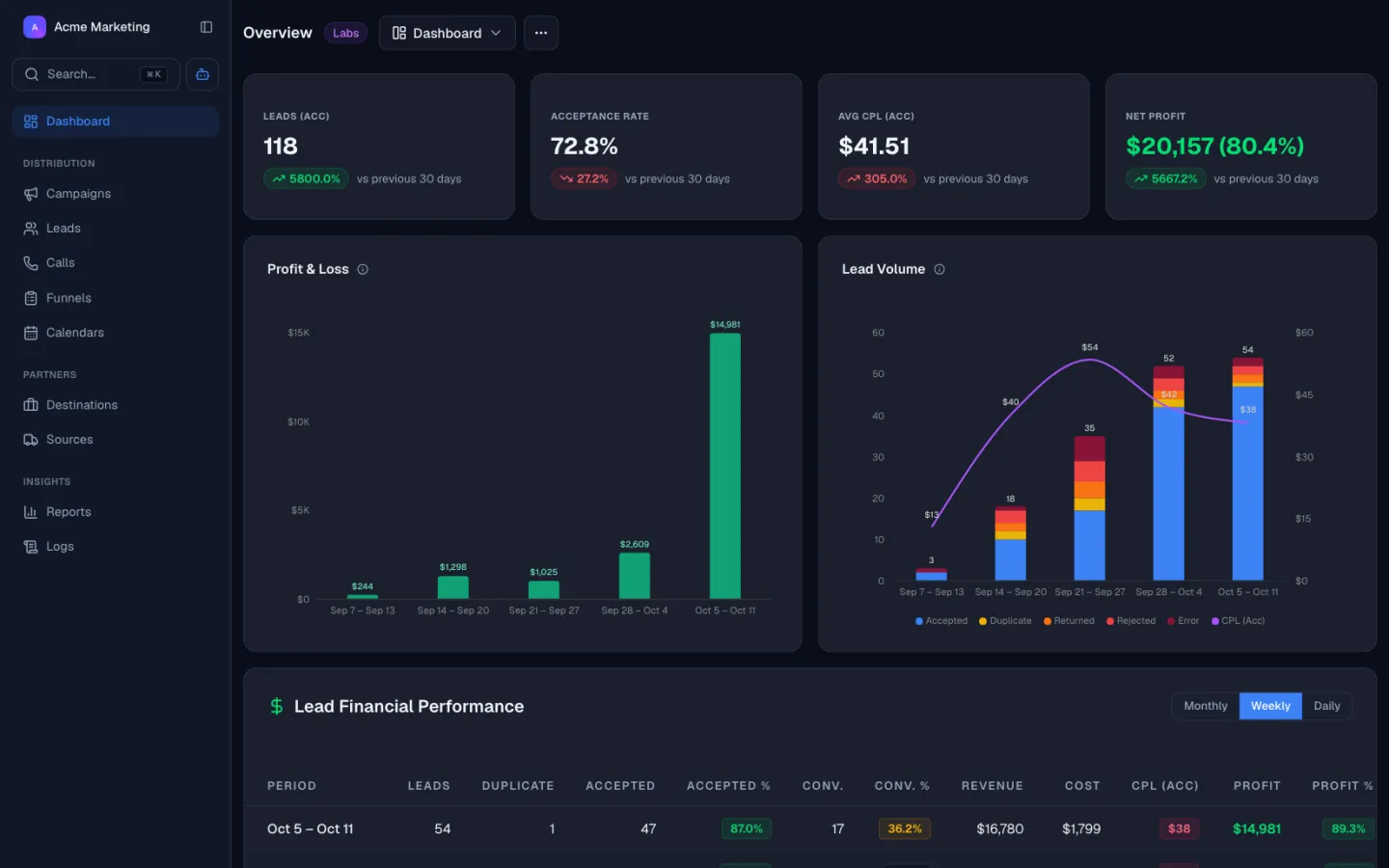
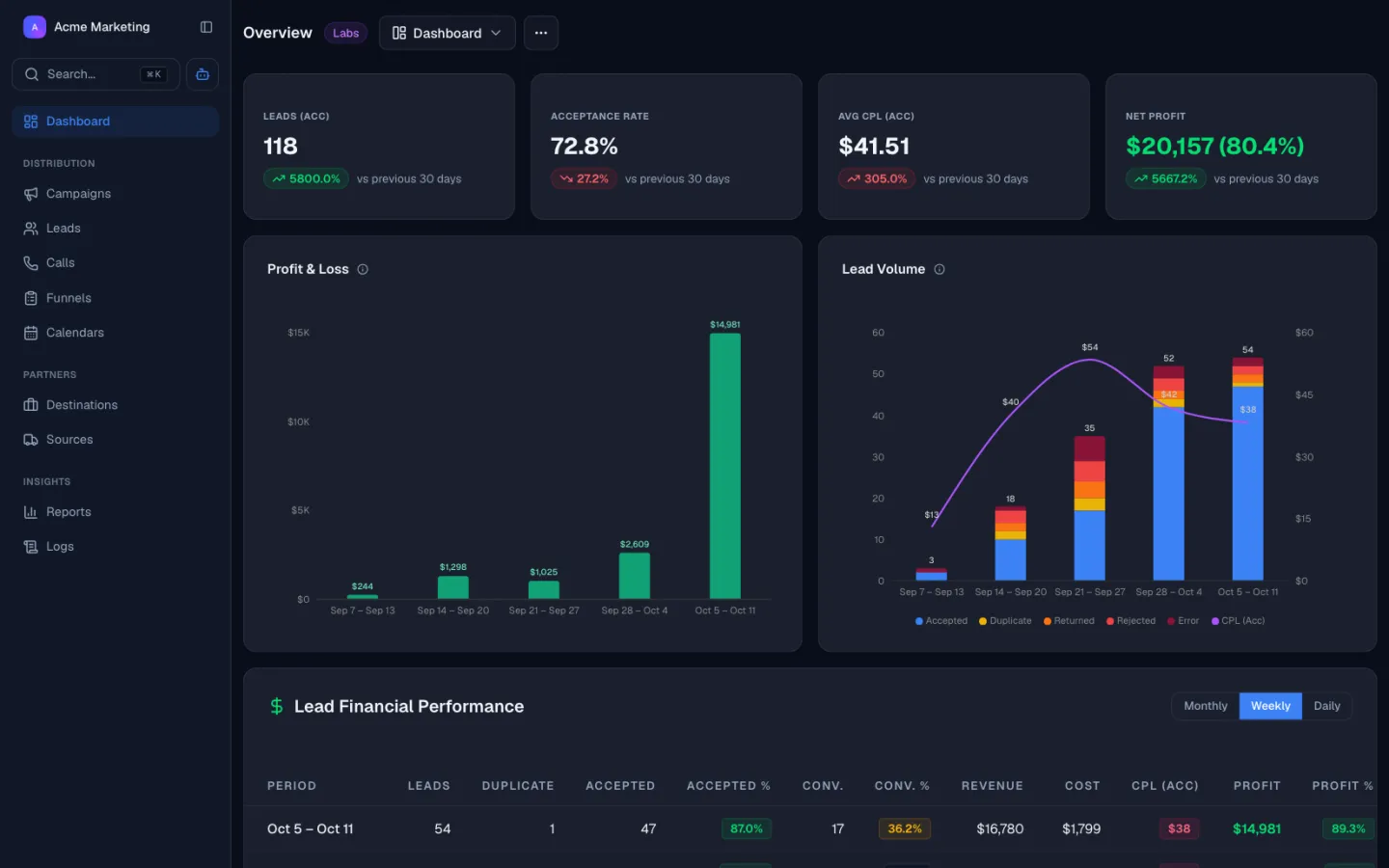
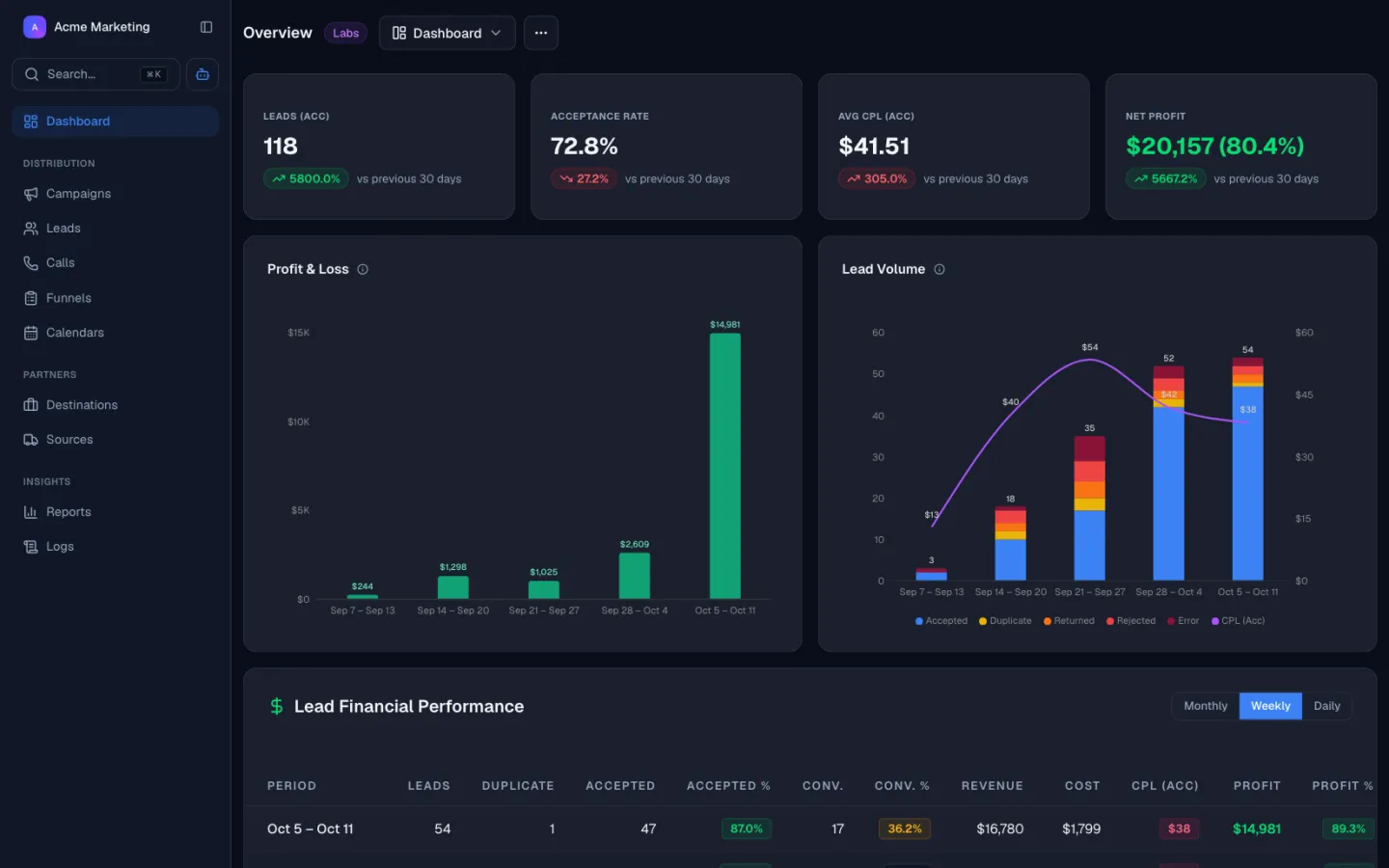
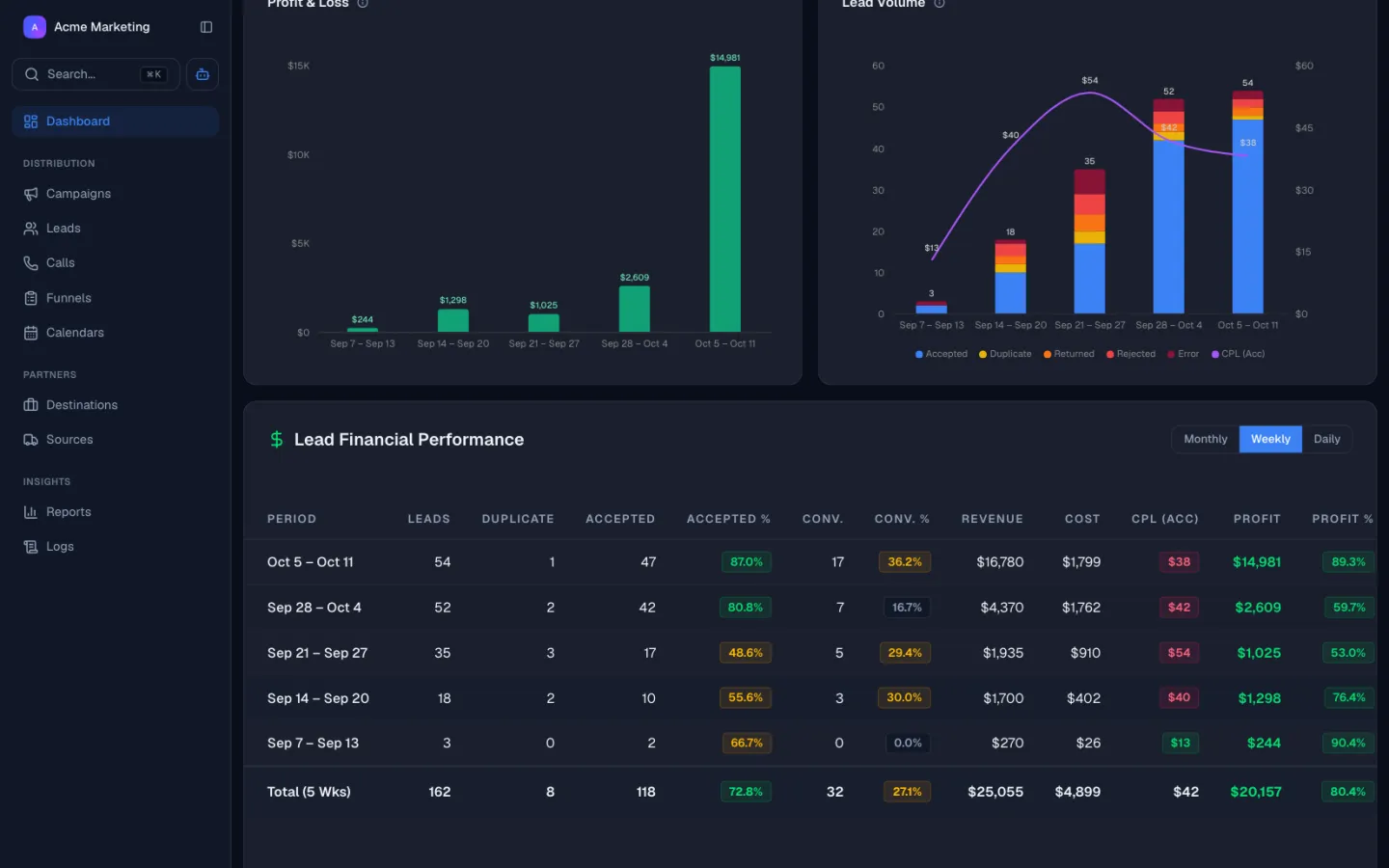
Stop guessing your margins. Watch every lead’s buy cost, sell price, and net profit in real time, filtered by source, buyer, vertical, and campaign.



Decision-Grade Data, Not End-Of-Month Reports
Live margin per lead
Publisher payout and buyer price are stamped on every lead at acceptance. Net margin per lead, per source, per buyer is calculated the moment the event happens, not at end-of-day.
Per-source profitability
Spot a losing source the same week it goes bad. Filter sources by margin, qualified-rate, and return rate so you can pause, reweight, or renegotiate publisher payouts before the next billing cycle.
Buyer and publisher in one view
Buyer acceptance rate, return rate, and average price sit next to publisher payout and volume. No manual joins across CRM, billing, and ping-post tools.
Setup in minutes, not weeks
Lead Distro AI's reporting is a query against the routing engine, not a separate data pipeline. There is nothing to wire, model, or maintain to see profit-and-loss per lead.
How Lead Distro AI works
See Your Numbers the Moment They Happen
Every routing event writes straight to the dashboard, so pacing, margin, and lead quality update live instead of at month end.
LIVE PACING
Track pacing as leads flow in
A live pacing report shows volume, accepted counts, and projected totals for every campaign. Watch the day build in real time and catch a campaign that is falling behind pace before the window closes.
Pacing Report
FebruaryLeads MTD
180
Accepted MTD
162
Daily Avg
9.0
Projected
252
SOURCE ROI
See true margin by source
Spend, revenue, and margin sit side by side for every traffic source. Spot the source that is quietly losing money and reweight budget the same week, not after the next billing cycle.
Source ROI
Month to dateQUALITY TRENDS
Watch lead quality over time
Lead quality scores roll up into Premium, Standard, and Low tiers, so you can see when a source starts sending weaker leads. The trend shows up the day it shifts, giving you time to act before margin erodes.
Lead Scoring
Rule gradedEverything in the Lead Reporting Dashboard
A live KPI surface that replaces spreadsheets, CSV exports, and stitched-together BI pipelines.
Live KPI dashboard
Revenue, cost, net margin, qualified-rate, and acceptance rate stream in as routing events happen. The dashboard refreshes the moment a ping, post, accept, reject, payout, or refund fires.
Per-source profitability
Publisher scorecards with attribution stamped at the source. See which publishers and campaigns produce profitable leads and which need a payout cut or a pause.
Per-buyer performance
Acceptance rate, return rate, and average price per buyer. Spot the buyer whose return rate just jumped and act before churn shows up in the bank account.
Vertical and geographic drill-down
Filter by vertical, state, and ZIP. Drill down from a margin chart to the individual leads driving it. Pause underperforming geos without pausing the whole campaign.
Custom report builder
Saved views per team member and per role. Operators see margin; account managers see buyer KPIs; finance sees reconciliation. One dashboard, scoped per seat.
Day-part and hour-of-day patterns
Hour-of-day and day-of-week analytics for capacity planning. Align publisher delivery with buyer business hours so you stop paying for leads that arrive after the contact center closes.
Exports and scheduled reports
On-demand CSV export and scheduled email reports on daily, weekly, or monthly cadences. Feed an external BI stack or brief stakeholders who do not log into the platform.
Lead Reporting by Vertical
The same engine surfaces different KPIs across legal, insurance, mortgage, solar, and home services.
Legal and PI
Track per-state qualified-rate and buyer acceptance to catch the week a TV or digital source starts sending low-quality MVA leads. Catch the dip in the same week, not the same quarter.
Insurance
Monitor return rate by source to catch fraud spikes the moment they cross a configurable threshold. Return-rate alerts protect buyer relationships before they churn.
Mortgage
Watch CPL versus revenue-per-lead margin in real time as rate-shopper volume fluctuates with the rates market. Reweight publisher delivery the same day, not after the next rate cut.
Solar
Compare installer acceptance rates by ZIP and surface high-margin geos for media reweighting. Pause underperforming ZIPs without pausing the campaign.
Home services
Track hour-of-day patterns to align publisher delivery with contractor availability. Stop paying for leads that arrive after hours and never get contacted.
Lead Reporting Software vs. CRM Reporting vs. a BI Stack
CRMs were built to track sales pipelines, not lead-buying margins. They report on "leads created," not on the margin those leads produced. Generic BI stacks like Looker and Tableau were built to model anything, which means they model nothing out of the box and require data engineering to wire into a lead distribution platform. Lead Distro AI's lead reporting was built for one job: tell a PPL network where the margin is, in real time.
| Capability | Lead Distro AI Lead Reporting | CRM reporting | Spreadsheet or BI stack | Generic ad attribution |
|---|---|---|---|---|
| Lead-level cost and revenue | Yes | No | Manual | Partial |
| Real-time refresh | Yes | Delayed | Manual export | Delayed |
| Buyer and publisher in one view | Yes | No | Manual join | No |
| Per-source margin | Yes | No | Manual | No |
| Built for PPL networks | Yes | No | No | No |
| Setup time | Minutes | Days | Weeks | Days |
| Custom views per role | Yes | Limited | Manual | Limited |
The data in the dashboard is correct because the routing engine wrote it. That is the difference between lead analytics software that lives inside the distribution platform and a BI tool bolted on after the fact.
Features That Pair With Real-Time Analytics
Reporting reflects what every other engine is doing in real time, because the routing engine writes the data.
See it run on your stack
Book a 20-minute demo or start your 7-day free trial. Full access to every feature, cancel anytime.
Customer Reviews
Why Companies Switch
to Lead Distro AI
Don't take our word for it. Here's what companies say after switching.
Our customers talk about
See it run on your stack
Book a 20-minute demo or start your 7-day free trial. Full access to every feature, cancel anytime.
Get Started
Start Distributing Leads. Free for 7 Days.
Call tracking and routing are included on every plan. Higher tiers add lead volume, seats, destinations, and ping post.
Starter
For agencies and media buyers running live campaigns.
Start Free Trial- Call tracking and recordingGet a tracking number, ring your Targets, and keep the recording. Call minutes and numbers are billed by usage on top of your plan.
- Lead distribution2,500 / moTake leads in from any source and send them to the buyers who want them. Your allowance counts leads that come in through the API. Duplicates we block, and leads that fail your filters, do not count.
- Appointments tracked2,500 / moSell booked appointments instead of raw leads. Mark each one showed and qualified, bill your buyers only when it counts, and give them a portal to see what they got. Counts appointments as they are booked.
- Live funnels5Hosted lead forms you build and publish on your own page. Drafts are unlimited. Only funnels that are live count against the limit.
- Campaigns5A campaign is one flow of leads or calls, usually one per vertical. It is where your sources and destinations connect. Only active campaigns count, so drafts and paused ones are free.
- Sources / destinations20Sources are where your leads and calls come from. Destinations are the buyers you send them to. Only active ones count against the limit.
- Seats3How many people on your team can log in. Buyers using the Partner Portal do not use a seat.
- AI credits500 / moOne credit for each message you send the AI assistant. It is a safety limit, not something normal use runs into.
- Ping postAsk your buyers what they will pay for a lead before you send it, then sell it to the highest bidder.
- White-label portalPut your own name, logo and domain on the Partner Portal, so your buyers see your brand instead of ours.
- Run your own ring treeAnyone can bid on other networks' calls. This is the other side: take live bids from your own buyers on every inbound call and connect the caller to whoever bids highest.
- MCP accessConnect Lead Distro AI to your own AI tools so you can build campaigns and pull reports by chat.
Growth
Everything unlocks here: ping post, RTB, and white-label.
Start Free Trial- Call tracking and recordingGet a tracking number, ring your Targets, and keep the recording. Call minutes and numbers are billed by usage on top of your plan.
- Lead distribution5,000 / moTake leads in from any source and send them to the buyers who want them. Your allowance counts leads that come in through the API. Duplicates we block, and leads that fail your filters, do not count.
- Appointments tracked5,000 / moSell booked appointments instead of raw leads. Mark each one showed and qualified, bill your buyers only when it counts, and give them a portal to see what they got. Counts appointments as they are booked.
- Live funnels20Hosted lead forms you build and publish on your own page. Drafts are unlimited. Only funnels that are live count against the limit.
- Campaigns10A campaign is one flow of leads or calls, usually one per vertical. It is where your sources and destinations connect. Only active campaigns count, so drafts and paused ones are free.
- Sources / destinations50Sources are where your leads and calls come from. Destinations are the buyers you send them to. Only active ones count against the limit.
- Seats10How many people on your team can log in. Buyers using the Partner Portal do not use a seat.
- AI credits2,000 / moOne credit for each message you send the AI assistant. It is a safety limit, not something normal use runs into.
- Ping postAsk your buyers what they will pay for a lead before you send it, then sell it to the highest bidder.
- White-label portalPut your own name, logo and domain on the Partner Portal, so your buyers see your brand instead of ours.
- Run your own ring treeAnyone can bid on other networks' calls. This is the other side: take live bids from your own buyers on every inbound call and connect the caller to whoever bids highest.
- MCP accessConnect Lead Distro AI to your own AI tools so you can build campaigns and pull reports by chat.
Scale
For networks routing more volume to more partners.
Start Free Trial- Call tracking and recordingGet a tracking number, ring your Targets, and keep the recording. Call minutes and numbers are billed by usage on top of your plan.
- Lead distribution15,000 / moTake leads in from any source and send them to the buyers who want them. Your allowance counts leads that come in through the API. Duplicates we block, and leads that fail your filters, do not count.
- Appointments tracked15,000 / moSell booked appointments instead of raw leads. Mark each one showed and qualified, bill your buyers only when it counts, and give them a portal to see what they got. Counts appointments as they are booked.
- Live funnelsUnlimitedHosted lead forms you build and publish on your own page. Drafts are unlimited. Only funnels that are live count against the limit.
- Campaigns25A campaign is one flow of leads or calls, usually one per vertical. It is where your sources and destinations connect. Only active campaigns count, so drafts and paused ones are free.
- Sources / destinations100Sources are where your leads and calls come from. Destinations are the buyers you send them to. Only active ones count against the limit.
- Seats20How many people on your team can log in. Buyers using the Partner Portal do not use a seat.
- AI credits5,000 / moOne credit for each message you send the AI assistant. It is a safety limit, not something normal use runs into.
- Ping postAsk your buyers what they will pay for a lead before you send it, then sell it to the highest bidder.
- White-label portalPut your own name, logo and domain on the Partner Portal, so your buyers see your brand instead of ours.
- Run your own ring treeAnyone can bid on other networks' calls. This is the other side: take live bids from your own buyers on every inbound call and connect the caller to whoever bids highest.
- MCP accessConnect Lead Distro AI to your own AI tools so you can build campaigns and pull reports by chat.
Enterprise
Custom plans for networks and high-volume operators.
- Call tracking and recordingGet a tracking number, ring your Targets, and keep the recording. Call minutes and numbers are billed by usage on top of your plan.
- Lead distributionCustomTake leads in from any source and send them to the buyers who want them. Your allowance counts leads that come in through the API. Duplicates we block, and leads that fail your filters, do not count.
- Appointments trackedCustomSell booked appointments instead of raw leads. Mark each one showed and qualified, bill your buyers only when it counts, and give them a portal to see what they got. Counts appointments as they are booked.
- Live funnelsCustomHosted lead forms you build and publish on your own page. Drafts are unlimited. Only funnels that are live count against the limit.
- CampaignsCustomA campaign is one flow of leads or calls, usually one per vertical. It is where your sources and destinations connect. Only active campaigns count, so drafts and paused ones are free.
- Sources / destinationsCustomSources are where your leads and calls come from. Destinations are the buyers you send them to. Only active ones count against the limit.
- SeatsCustomHow many people on your team can log in. Buyers using the Partner Portal do not use a seat.
- AI creditsCustomOne credit for each message you send the AI assistant. It is a safety limit, not something normal use runs into.
- Ping postAsk your buyers what they will pay for a lead before you send it, then sell it to the highest bidder.
- White-label portalPut your own name, logo and domain on the Partner Portal, so your buyers see your brand instead of ours.
- Run your own ring treeAnyone can bid on other networks' calls. This is the other side: take live bids from your own buyers on every inbound call and connect the caller to whoever bids highest.
- MCP accessConnect Lead Distro AI to your own AI tools so you can build campaigns and pull reports by chat.
Only buying and selling calls?
Call Tracking Only
Call tracking, recording, and call routing, without lead distribution.
3 campaigns, 5 sources and destinations, 2 seats.
Call tracking and routing rates, billed as you use it
Call tracking is on every plan, not just this one. Numbers provision instantly from the dashboard, call recording included.
Talk with Our Team
See how Lead Distro AI fits your workflow. Pick a time and we'll walk you through it.
Lead Reporting and Analytics FAQs
What is real-time lead reporting?
What is the difference between lead reporting and lead analytics?
What KPIs does Lead Distro AI track?
Can buyers see their own reporting?
Does the lead generation dashboard refresh in real time?
Can I export reports?
Does this replace my BI tool?
How is qualified-rate calculated?
Still have questions?
Book a 20-minute demo and we'll walk through your exact use case, or start your 7-day free trial and explore on your own.
Ready to See Where Your Margin Lives?
Start your 7-day free trial and watch your first lead post profit-and-loss in real time. No data engineering, no spreadsheets, no end-of-month surprises.